
Save in 97-2003 Format
If you save your Excel files in 97-2003 format (.xls instead of the new .xlsx format), users who do not have Excel 2007 or later installed on their computer, can still open your Excel files.
1. Open a workbook.
2. On the File tab, click Save As.
3. Select Excel 97-2003 Workbook (*.xls) from the drop-down list.
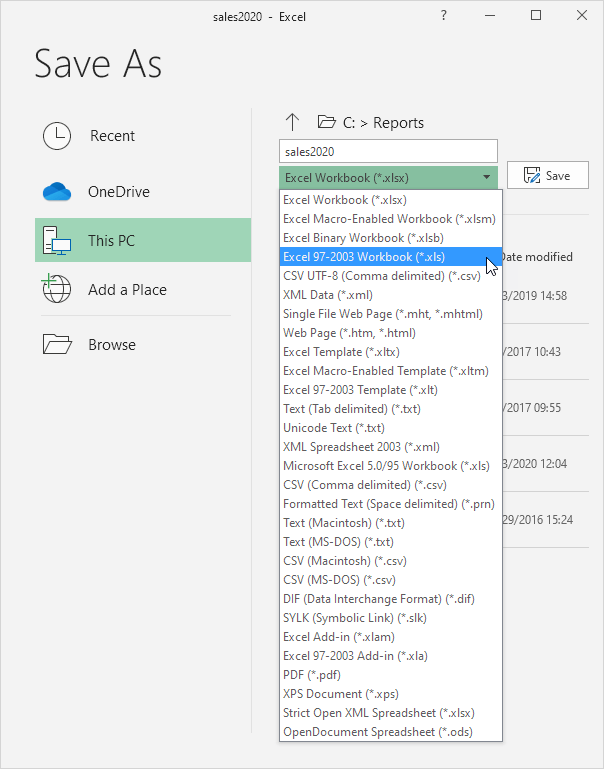
4. Click Save.
To automatically save your Excel files in 97-2003 format, execute the following steps.
5. On the File tab, click Options
6. On the left side, click Save and select Excel 97-2003 Workbook from the drop-down list.
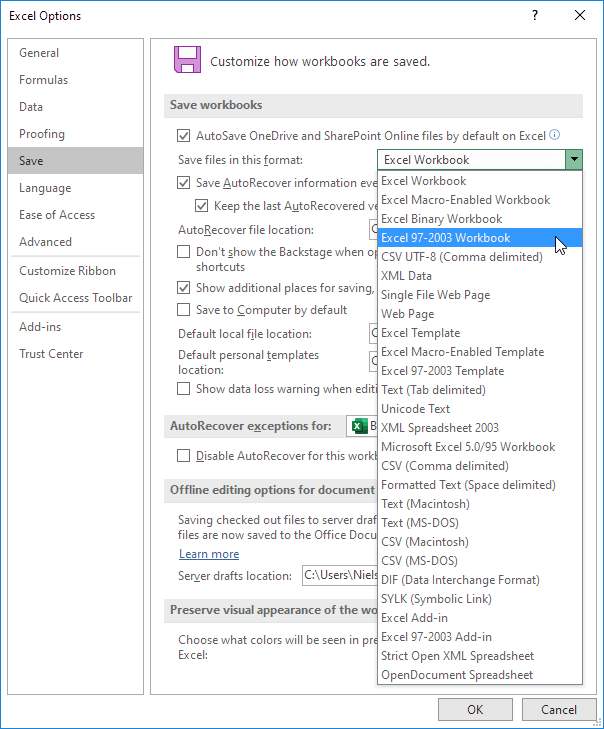
7. Click OK.
Note: Excel will always give you a warning if features are not supported in 97-2003 format, so you can save the file in the new .xlsx format (Excel Workbook).


